
Native HubSpot integration to match, create, and enrich your HubSpot records with Cause IQ data
In this help article...Cause IQ's HubSpot integration runs natively within HubSpot, and is included for our Pro and Enterprise customers. The integration contains three primary components:
You access the integration completely within HubSpot. While you must authenticate your Cause IQ account and maintain an active subscription, you never need to leave HubSpot to use the integration (although you must have a saved Cause IQ search oh hand when creating new HubSpot records in bulk).
Cause IQ's HubSpot integration is currently in private beta. If you are a Pro or Enterprise customer and want to help test out the integration, please contact your Cause IQ point of contact.
To start using Cause IQ's HubSpot integration, access the link to start the connection and permissions between Cause IQ and HubSpot. As of February 2026, reach out to your Cause IQ point of contact to obtain the link (we will list the Cause IQ integration in the HubSpot Marketplace in the future). Upon clicking the link, you'll see this screen:
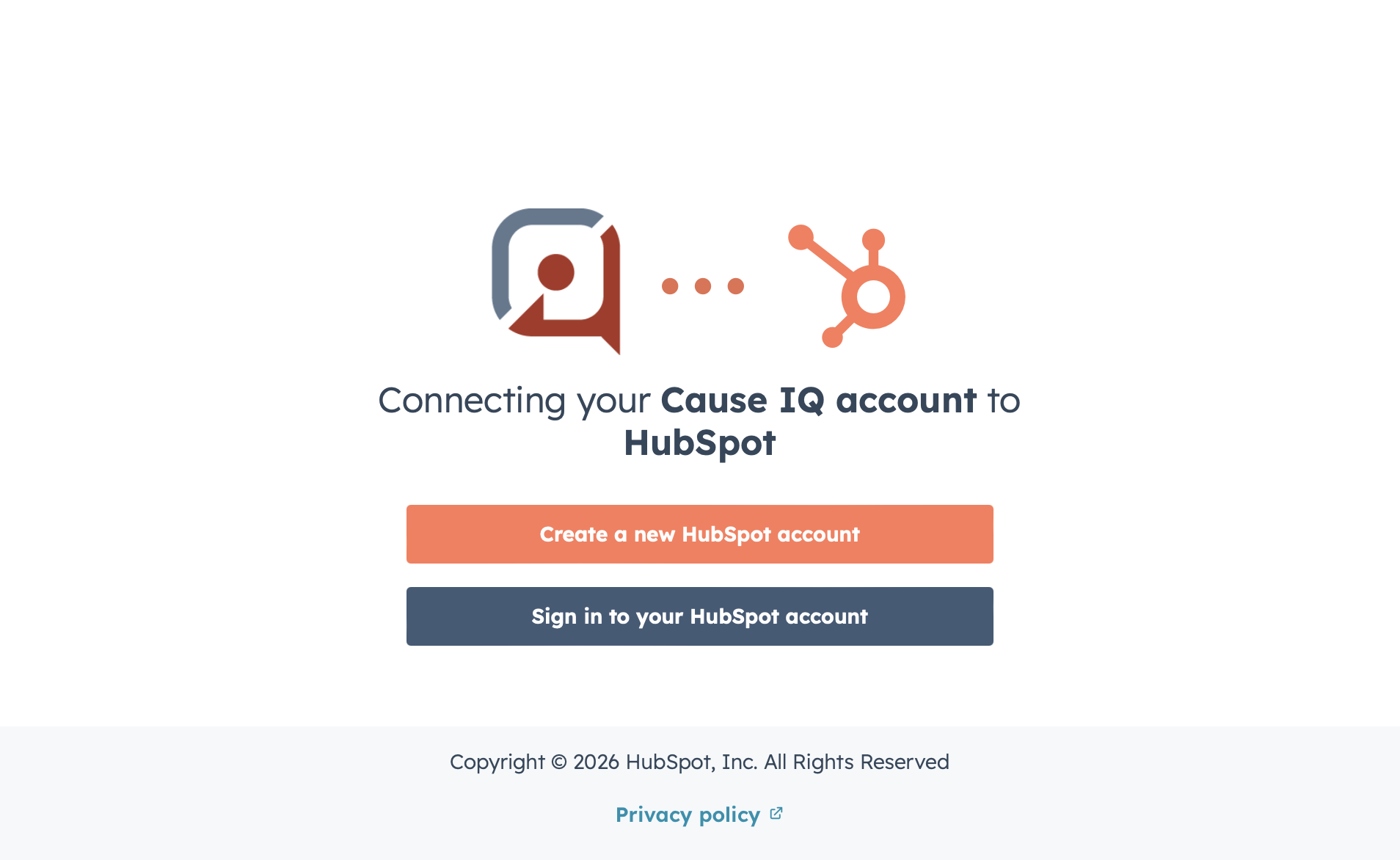
Click the Sign in to your HubSpot account button and enter your credentials. If your account has access to multiple HubSpot instances, select the instance you want to connect to Cause IQ.
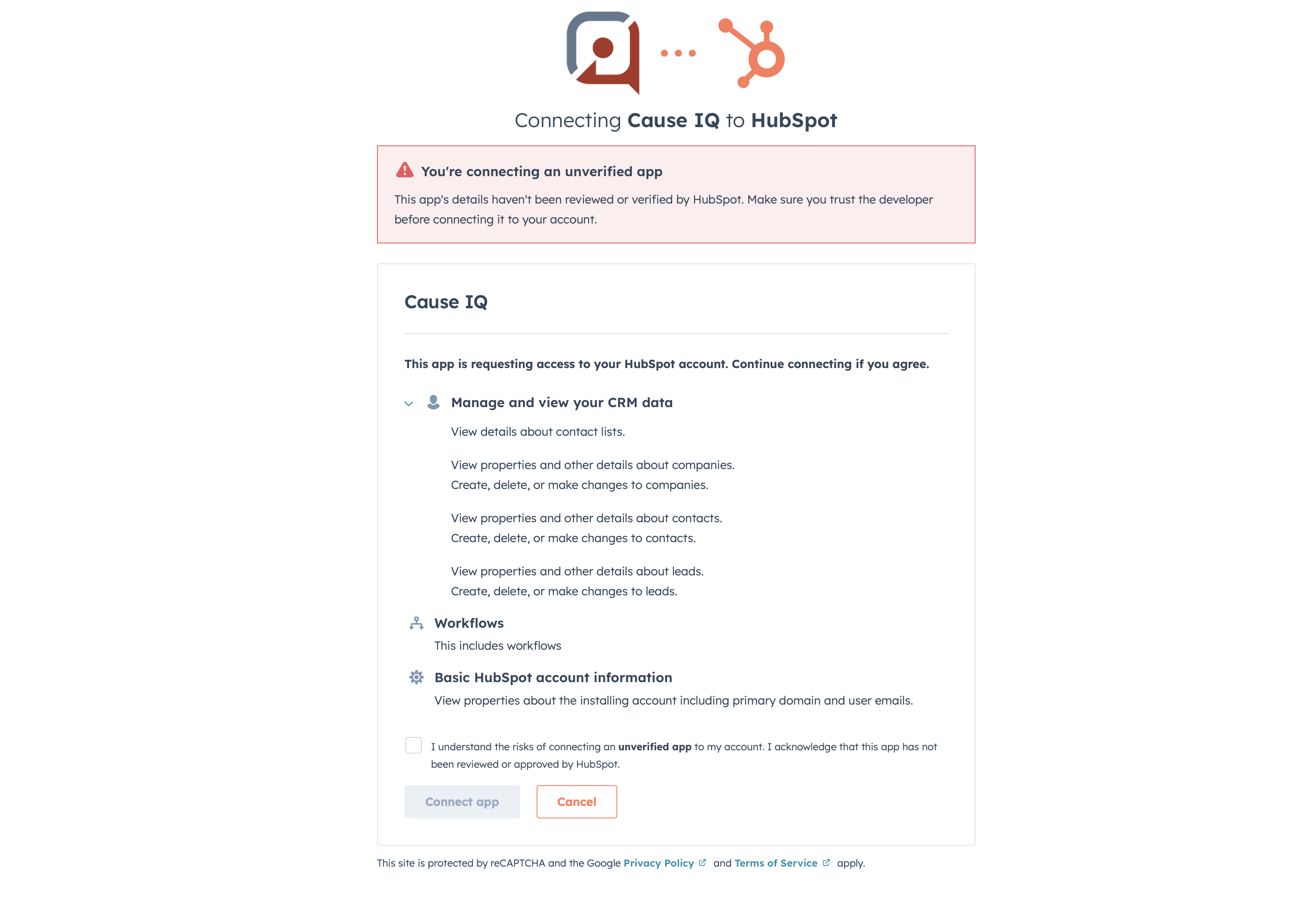
The "Connecting Cause IQ to HubSpot" screen lists the permissions that Cause IQ needs for the integration to work. Review and make sure you are comfortable granting Cause IQ these permissions.
As of February 2026, the integration is currently in private beta and has not yet been reviewed by HubSpot, so you will see an “Unverified app” warning up at the top of the page and in a checkbox at the bottom. Upon conclusion of our beta, Cause IQ will submit our integration to HubSpot for review and listing within their Marketplace.
Check the checkbox at the bottom and click Connect app. You will now be forwarded to Cause IQ, to log in to your Cause IQ account (if you aren't already logged in).
Your HubSpot account's email must be the same email as the email in your Cause IQ account. If the two accounts do not have the same email, the integration won't work.
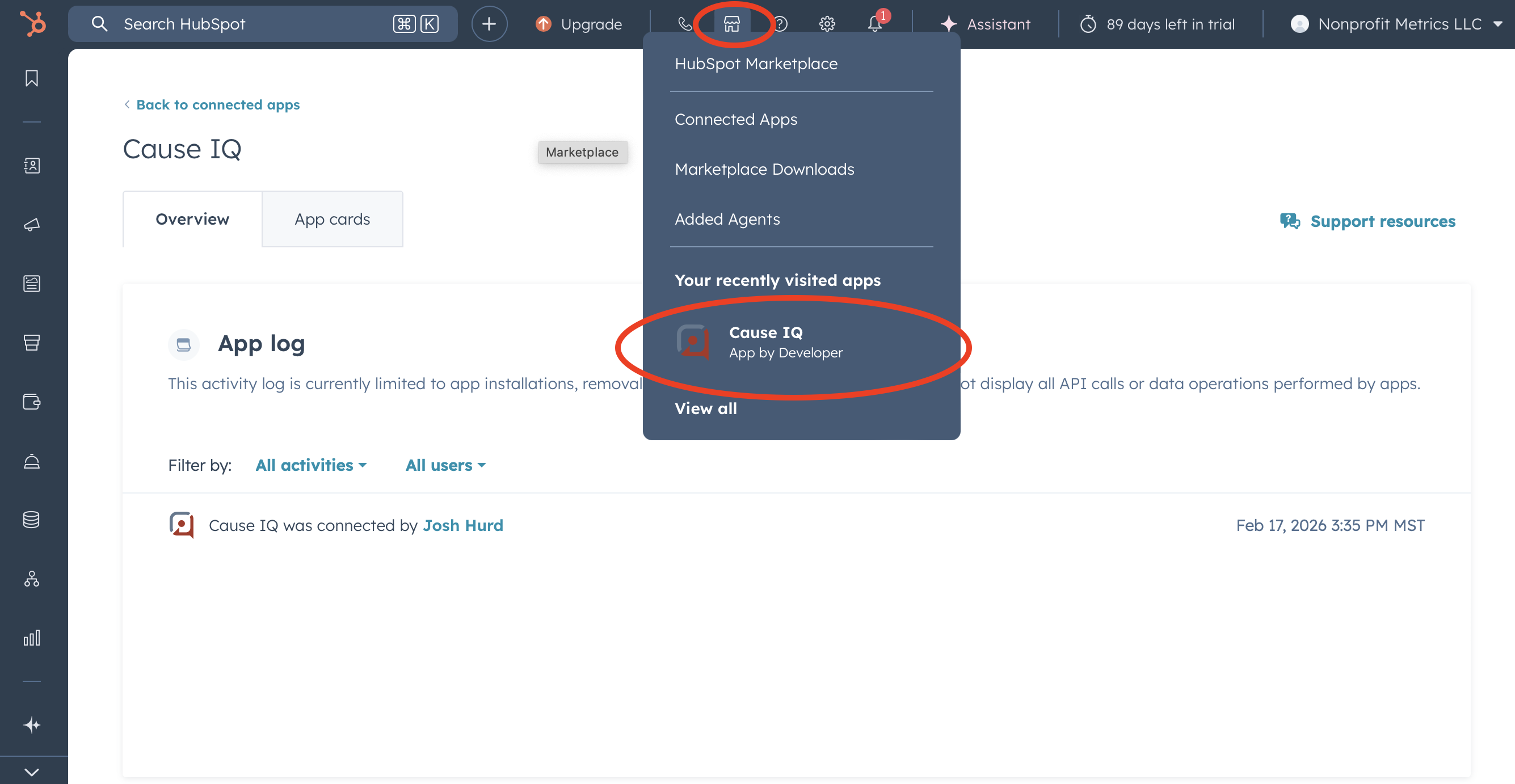
You should automatically be forwarded to the Cause IQ integration homepage within HubSpot. If you aren't, click the marketplace icon in the top navigation bar and then click Cause IQ. If you don't see "Cause IQ", click the View all link and select the integration from there.
Cause IQ's HubSpot integration supports full custom property mapping for the default and custom properties on your HubSpot Company objects. By default, the following properties are mapped:
To further customize property mapping, click the Settings tab on the right side of the Cause IQ integration home page within HubSpot.
As of February 2026, the Cause IQ HubSpot integration supports Company records only. Contacts and Leads are coming later in the year.
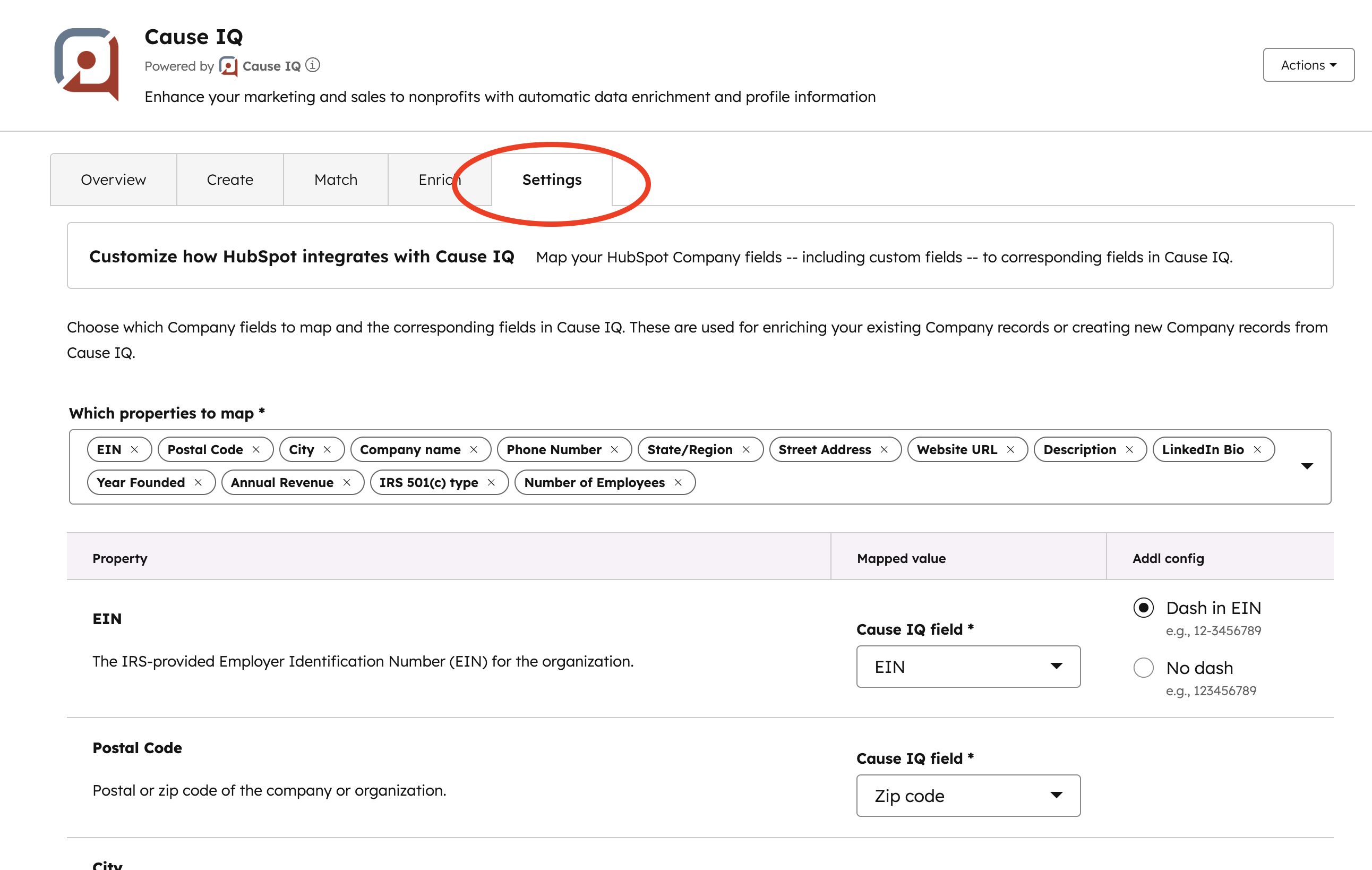
Within the "Which properties to map" section:
For each mapped property, you can customize what values to use when a Company record is created or enriched:
Note that the Cause IQ fields shown for mapping depend on the data type of the HubSpot property you select. For example, numeric HubSpot properties can only map to numeric Cause IQ fields and text properties cannot map to numeric fields.
After making changes, be sure to click Save at the bottom of the page to apply your updates.
Visit the Filter and field glossary to peruse all fields available in Cause IQ.
If you want to enrich your existing HubSpot records with data from Cause IQ, matching these records to the corresponding legal tax-exempt entity in Cause IQ is the first step. Click the Match tab in your Cause IQ integration home.
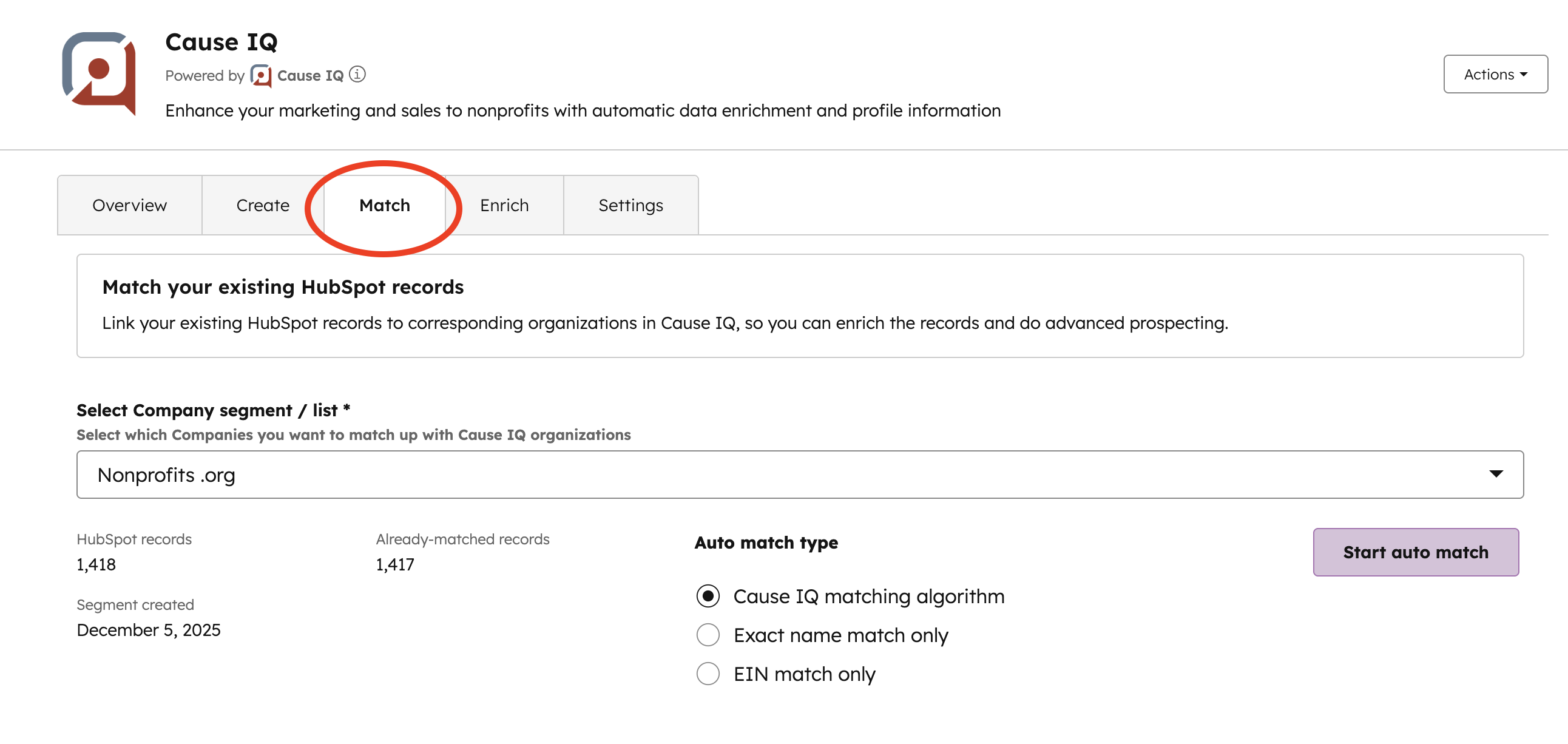
You must select a HubSpot list / segment of Companies for matching. We do this so that you have granular control over which Company records you want to match with Cause IQ, versus an all-or-none approach. When you select your segment, the integration will show you:
If you choose to proceed with matching from this list, you'll have two or three different methods for matching ("Auto match type"):
When you are ready to start matching, click the Start auto match button. Matching will occur in the background; you don't need to stay on this page. A progress bar will appear, updating every few seconds, showing you the percentage completed.
You will be emailed the results of the match in a CSV file, when the matching is complete.
You can update your existing HubSpot Company records with Cause IQ data, for any of the Company properties you mapped in the "Settings" tab. From your Cause IQ integration home page, click the Enrich tab.
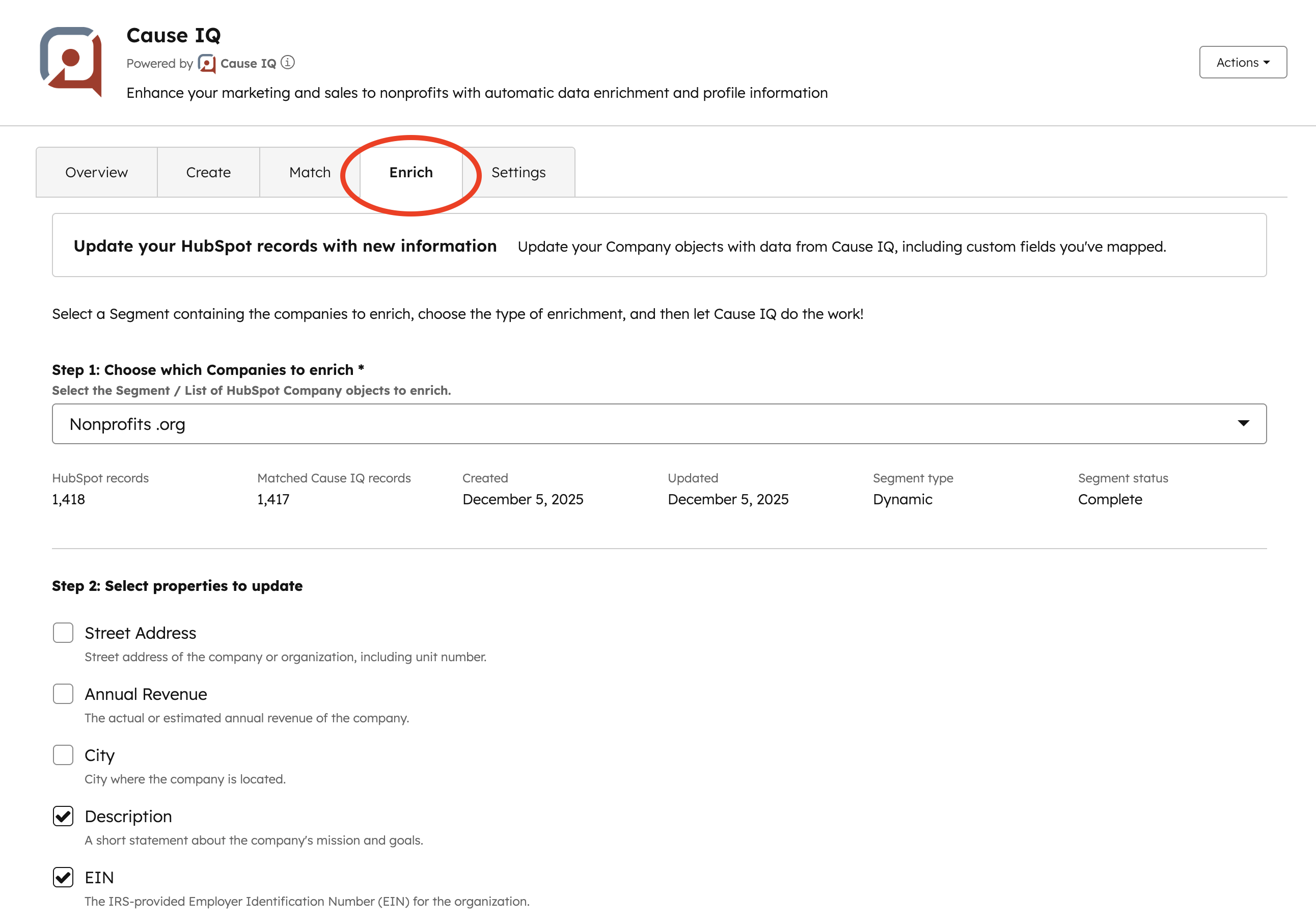
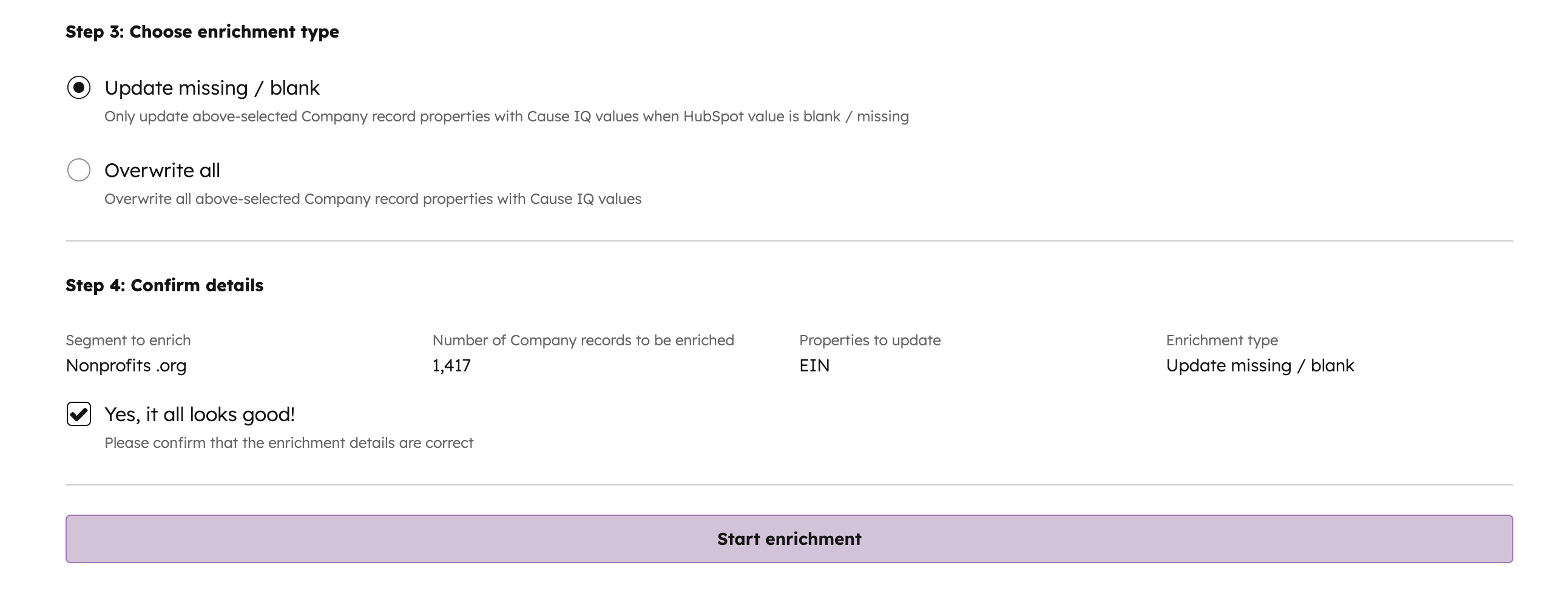
The enrichment process consists of four steps:
Step 1: Choose which Companies to enrich
You must choose a HubSpot segment / list of Companies to enrich. This way you can get granular with the types of records you want to update, such as just records with missing EINs.
After you select a segment, the integration will calculate how many of the HubSpot records in the list have been matched to nonprofits in Cause IQ. It is only these matched records that will be enriched. For example, if your segment has 1,394 HubSpot records and 283 matched Cause IQ records, the enrichment will only process those 283 matched records.
Step 2: Select properties to update
You have granular control over which Company properties you want to update as part of this enrichment. This step shows all properties that you have mapped to Cause IQ. Select the checkboxes or property names to update the properties in this enrichment.
Step 3: Choose enrichment type
There are two different ways to enrich records, based on whether you want to overwrite all property values, or only some.
The "Update missing / blank" enrichment type works by loading the values of the records set to be enriched, and comparing these current property values in HubSpot to the values in Cause IQ. It will do partial updates, so if you select four properties to enrich with an update missing / blank enrichment type, and a given record has two blank values and two existing values, the enrichment will update that record for just the two blank properties. An overwrite all enrichment in this case would update all four properties.
Step 4: Confirm details
This step brings in the enrichment details you've configured in the previous steps, so you can review and make sure it looks good. Check the Yes, it all looks good! checkbox and click the Start enrichment button to start processing.
The enrichment will work as a background process on Cause IQ's servers, so you don't need to stay on this page. If you do stay, though, a progress bar will appear that updates every few seconds to show you percent completed. You will receive an email when the enrichment is done that contains a summary of results and a CSV file attachment with details on specific records enriched, skipped, or HubSpot errors that occurred.
You can create HubSpot Company records individually and in bulk from within the Cause IQ integration home page. Click the Create tab. You'll have two different options:
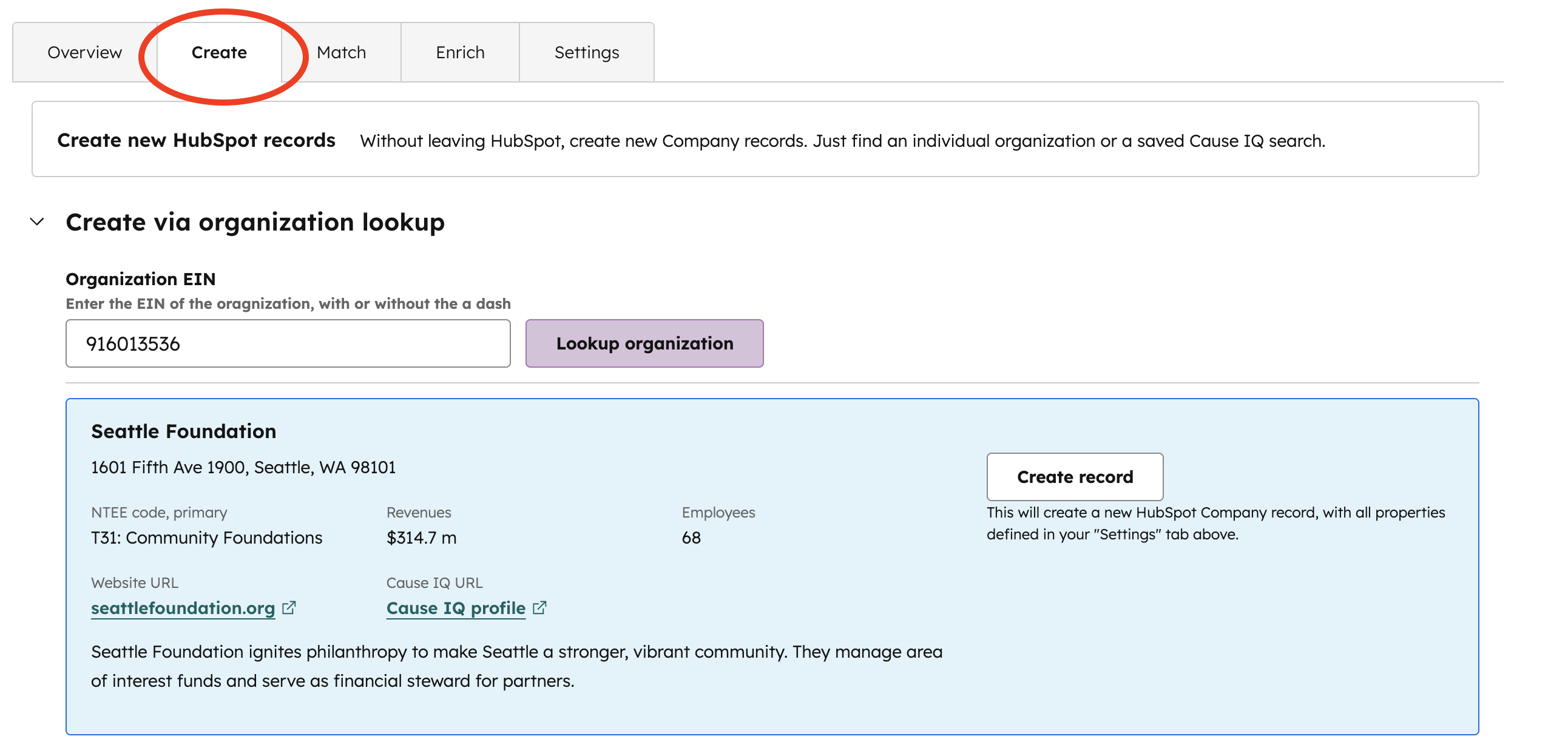
Create via organization lookup
To create HubSpot Company records one-at-a-time from organizations in Cause IQ, copy-and-paste the EIN of the organization (with or without the dash) into the "Organization EIN" input box, then click Lookup organization. The system will confirm the EIN is valid, check for existing matches, and display high-level details of the organization (to make sure you have selected the right one). Click the Create record button to create the Company record.
Create via saved Cause IQ search
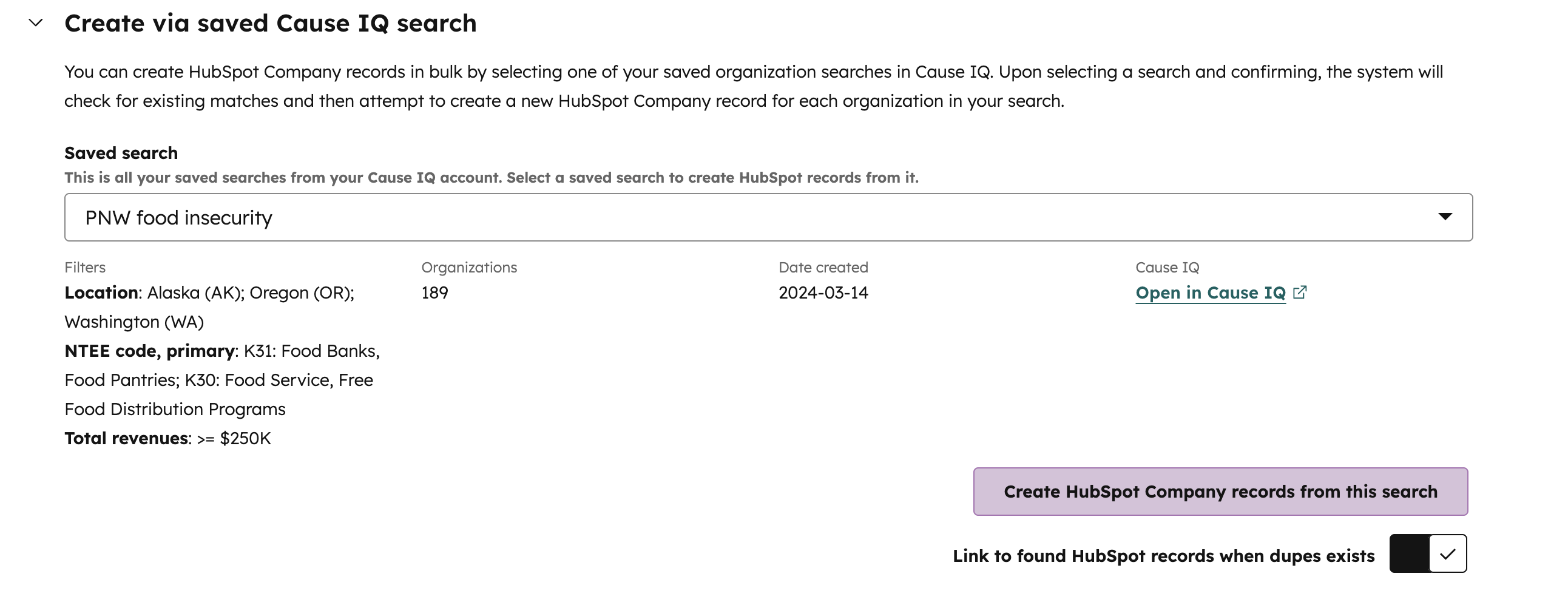
If you want to create dozens to thousands of organizations in bulk, you must first save an organization search from within Cause IQ that contains the organizations you want to create in HubSpot. Once the search is ready, select it from within the dropdown. The integration will pull metadata about the search, so you can confirm the filters and that the search is the right one.
The "Link to found HubSpot records when dupes exist" option dictates what to do when a duplicate record is found. Cause IQ tries to prevent duplicate Company records by querying your HubSpot account for records with the same name, website, or EIN. If we find a dupe, you can either ignore (unselect this option) or have the HubSpot record matched and linked to the corresponding nonprofit in Cause IQ (select this option).
To start the bulk creation, click the Create HubSpot Company records from this search button. The integration will start a background process on Cause IQ's servers, so you can leave this page if you want. If you stay, there will be a progress bar that updates every few seconds letting you know the results so far. Upon completion, you will receive an email containing a CSV file of the results.
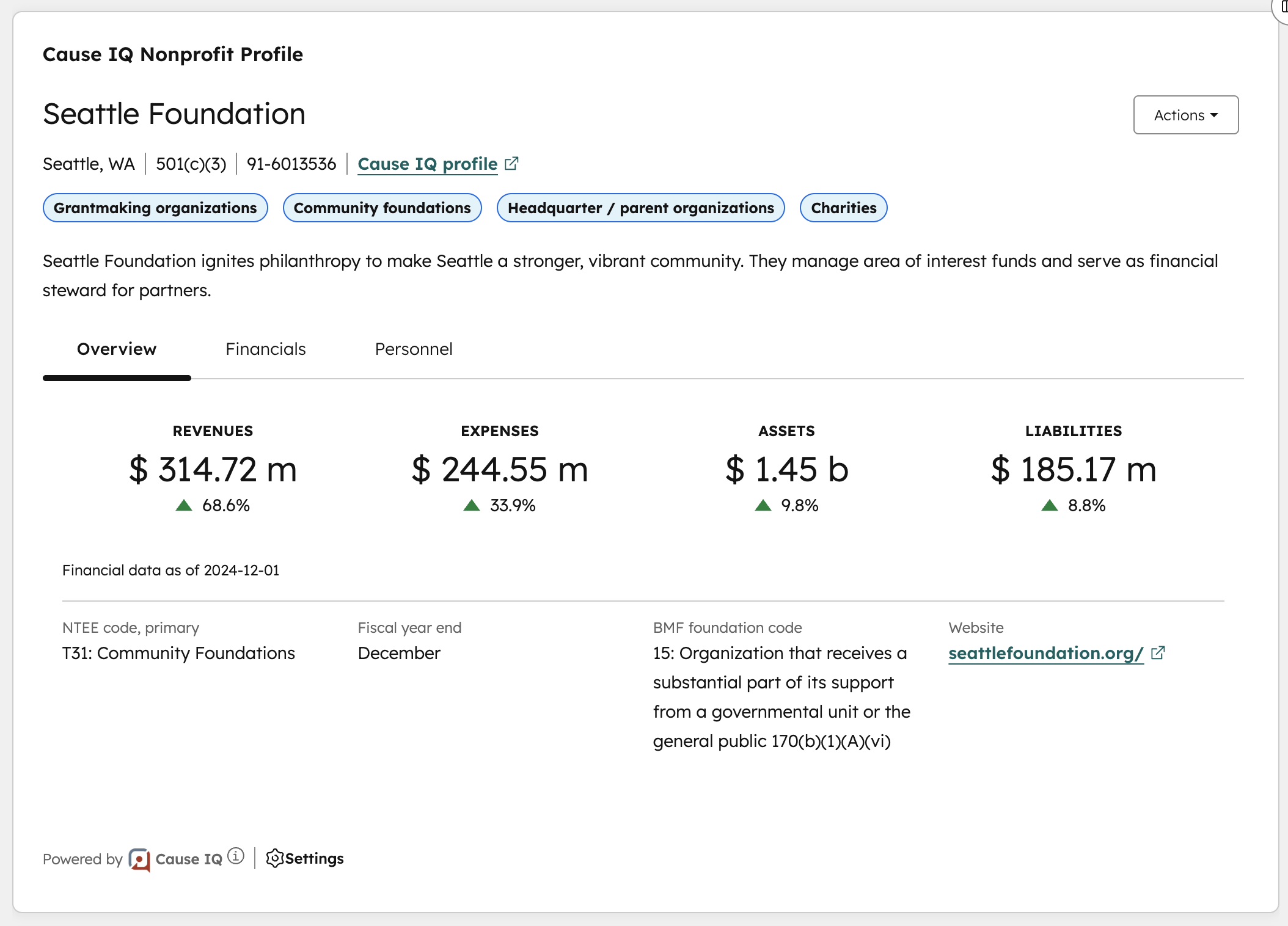
Cause IQ's HubSpot integration includes a Company record Card for displaying Cause IQ data on a matched record. The card also provides matching and enriching functionality for the record.
Adding the Card
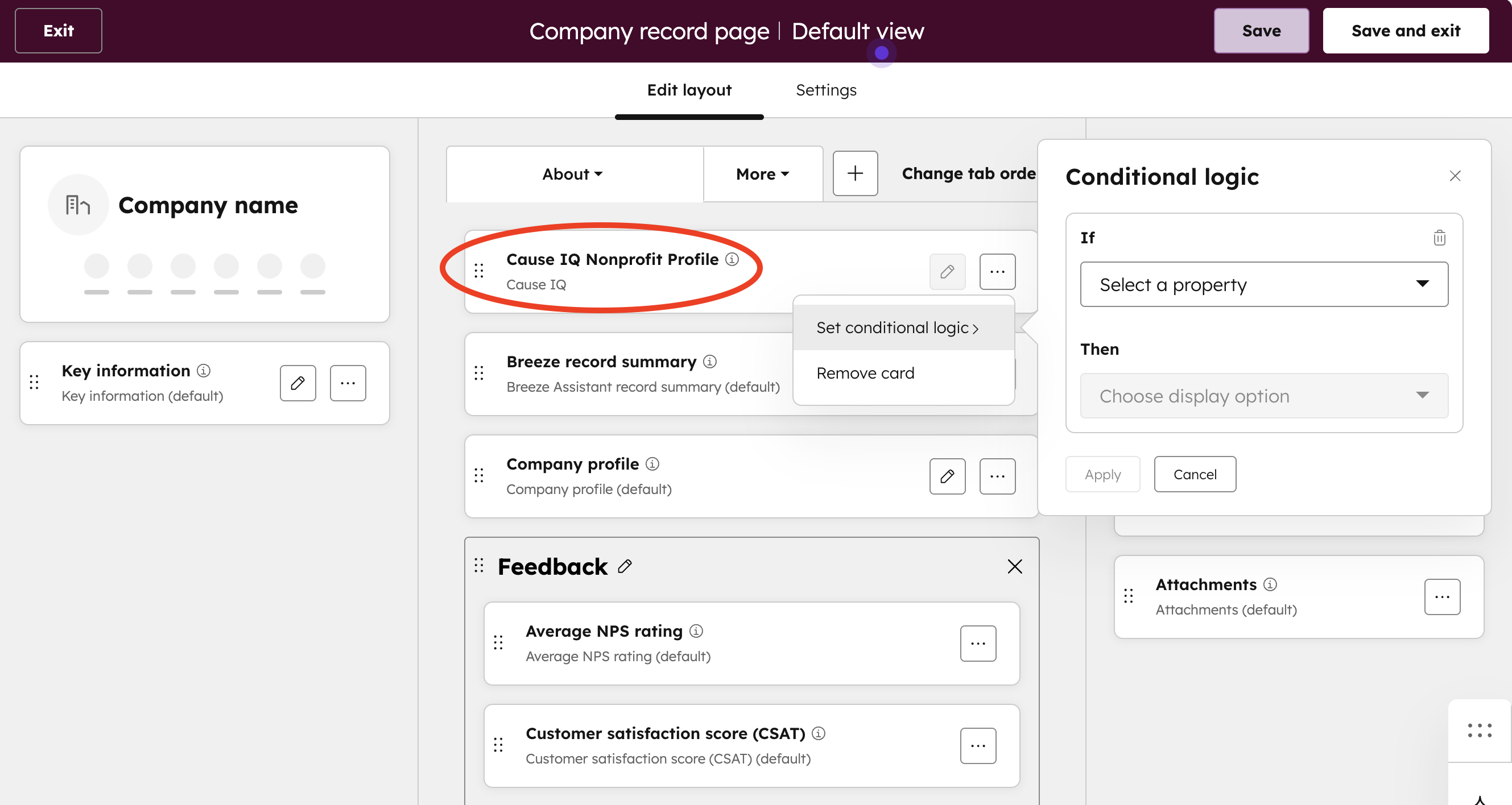
View this HubSpot support article to learn how to customize Company records. The "Manage cards on the record" section is relevant here. Look for the "Cause IQ Nonprofit Profile" card, and drag-and-drop to the location where you want it to appear.
If you only want the card to appear on certain Company records, click the three dots on the card and select the Set condition logic menu item. This way you can hide the card on non-relevant record types.
Matching an individual Company record
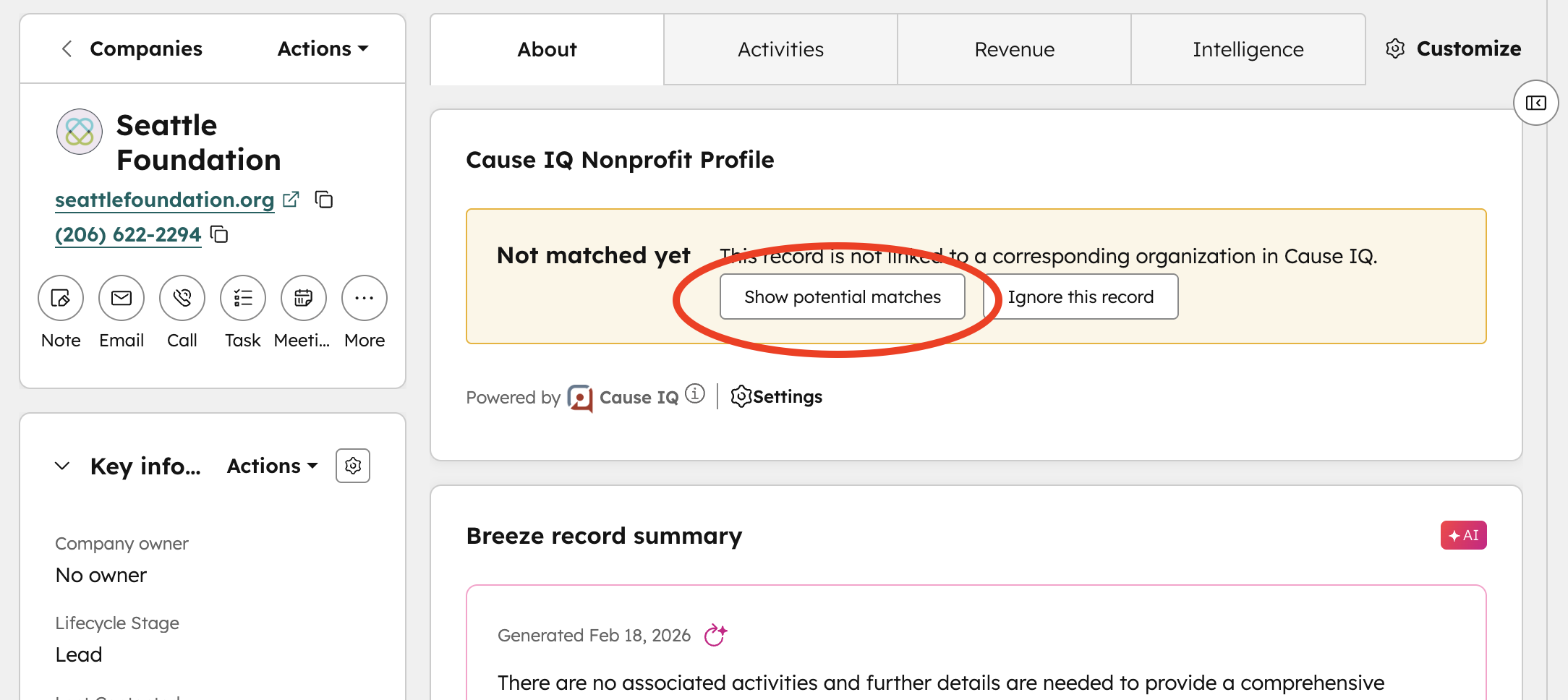
If the Cause IQ Nonprofit Profile card is visible on a Company record, and the record hasn't been matched yet, click the Show potential matches button to see the most likely matches to this record. The matches are generated based on name, location, website domain, and EIN (if available).
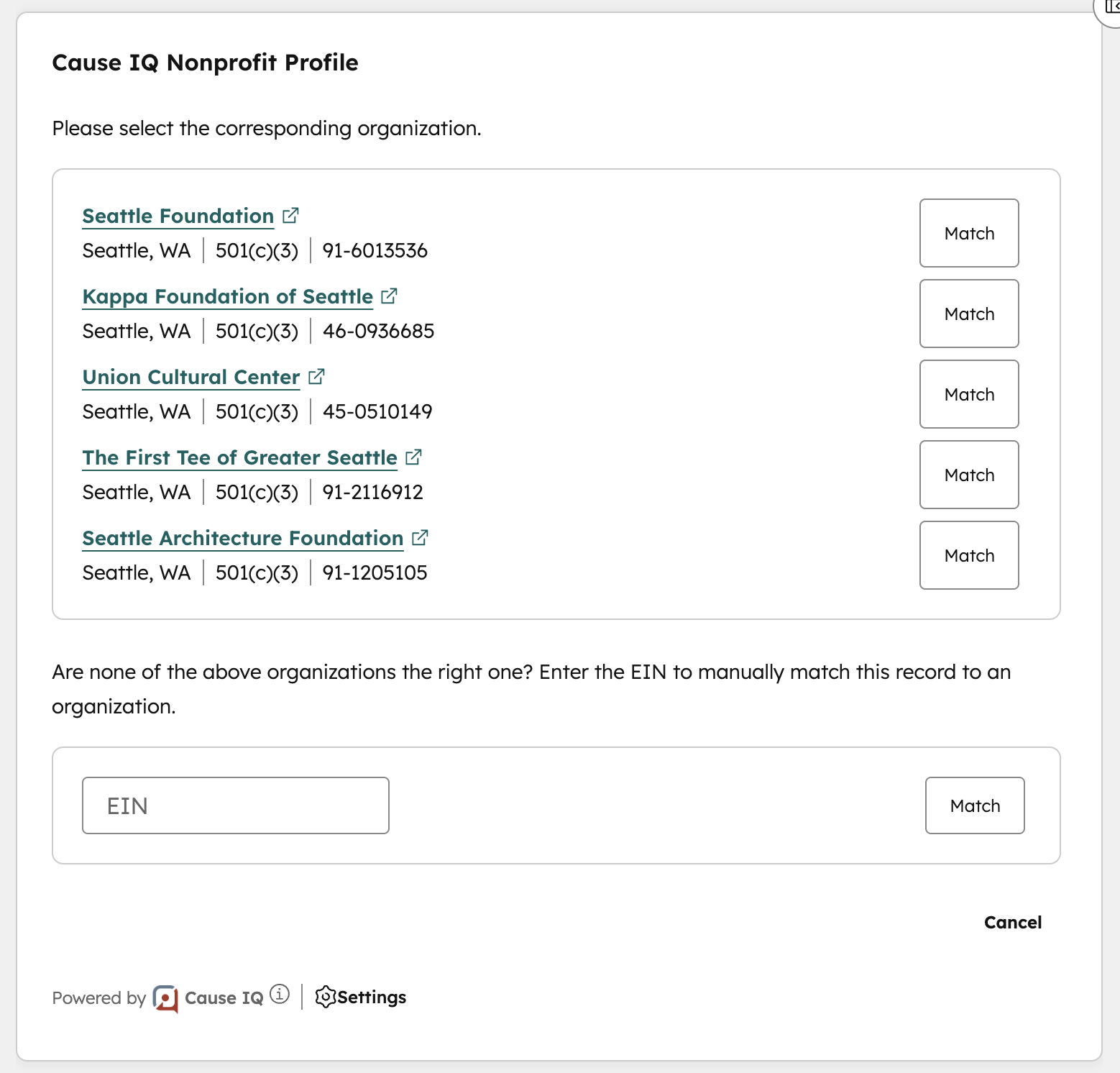
Click the Match button to select the corresponding organization. If none are the right match, and you know the organization's EIN, enter the EIN in the input box below and click Match.
Viewing detailed Cause IQ nonprofit information
The Cause IQ Nonprofit Profile contains detailed information on the organization pulled live from Cause IQ's database. The profile contains descriptive and category tags up top, with three tabs of information below:
We will be adding new information to these profile page cards in the future. Do you have any requests? Reach out to your Cause IQ point of contact to let us know.
Enriching an individual Company record
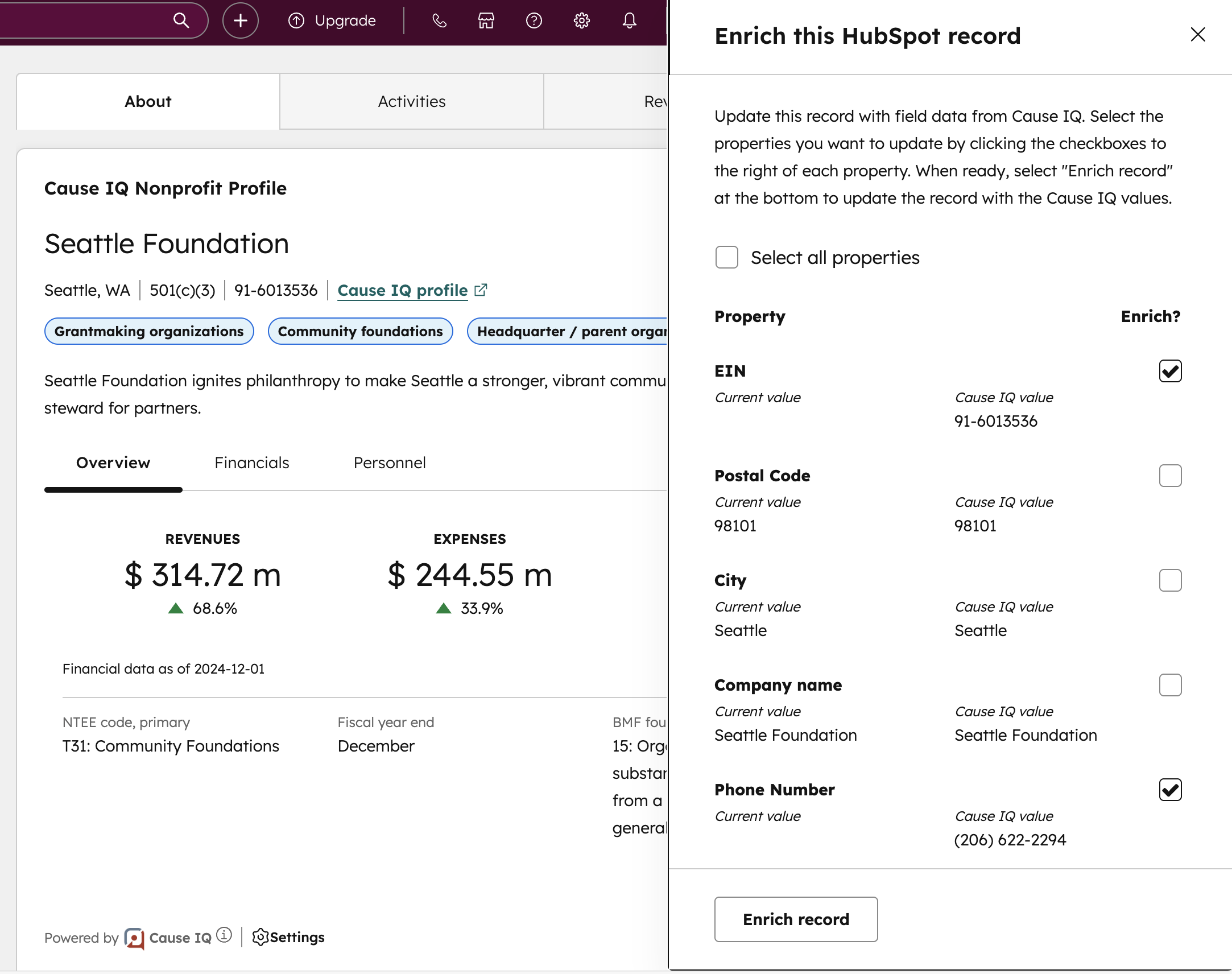
You can enrich an individual HubSpot record with data from Cause IQ from within the Cause IQ Nonprofit Profile card. Click the Actions button in the top-right corner and select the Enrich this HubSpot record option. A panel will open up showing all properties available to enrich, including the current HubSpot record value and Cause IQ value for each property. Select which properties you want to update and click the Enrich record button at the bottom-right of the screen. The record will be enriched and the page will automatically refresh itself.
February 19, 2026
February 11, 2026
January 23, 2026
Not finding what you need? Contact support
© 2026 Nonprofit Metrics LLC
Terms of Service and Privacy Policy
225 West Front Street
Missoula, MT 59802